Managing a Cold Email Sending Infrastructure Across Multiple Domains
Fixing cold email requires fixing your sending infrastructure, not just your copy.

Managing cold email sending infrastructure across multiple domains is an engineering discipline. Domains, mailboxes, authentication, IP reputation, warmup, and rotation depend on one another. A weak layer can hurt deliverability across the system, so the setup needs care and the system needs to be managed over time.
Why cold email infrastructure fails at the system level, not the message level
Practitioners often spend their time refining subject lines, personalization, and sequences when the failure governing inbox placement sits below the message. Inbox providers check the envelope and headers before the content, so authentication and reputation signals come before how professional the message looks. Copy cannot repair a broken authentication record. When messages fail at that gate, changing a call to action addresses the wrong problem.
The same dependency extends beyond DNS. A gap in warmup undermines correctly authenticated sending, while a poor domain naming decision can weaken an otherwise healthy sending history. These settings form a chain in which a misconfigured layer degrades the performance of the layers above it. Deliverability diagnosis therefore starts with the sending system rather than assuming that low engagement proves the message is weak.
Why the primary domain must stay completely out of cold outreach
The primary business domain must stay separate from cold outreach because prospecting can put its reputation at risk and harm normal business email. Bounces, spam complaints, and unsubscribe signals accumulate against the sending domain. A blacklist event can consequently affect employee-to-customer messages, billing notifications, and support tickets originating from that domain. The exposure extends well beyond the outbound campaign.
For a business using acme.com, that means keeping it for normal business email and using a separate domain such as tryacme.com for prospecting. The separate registration establishes the isolation boundary. A subdomain such as sales.acme.com or a Google Workspace domain alias does not provide the same separation because it shares the parent domain’s reputation. Although either may appear cheaper and easier to administer, neither satisfies the reason for creating secondary infrastructure in the first place. Domain isolation is therefore a foundational rule.
How to name, register, and size a secondary domain portfolio
Secondary domain names should make the brand easy to recognize while keeping the primary domain safe from campaign risk. Suitable patterns include tryacme.com, getacme.com, acmehq.com, and useacme.com. Consistency makes the portfolio easier to monitor. Assigning one prefix or suffix family per client avoids the monitoring complexity of mixing naming patterns, while registering variants such as.com,.io, and.co keeps a single variant from being the only available asset in that family.
The extension also influences credibility. The preferred choice is.com, while.io and.ai are workable alternatives and.info and.biz have associations with spam patterns. Registrar selection affects naming, DNS management speed and cost. Namecheap, Cloudflare, and Squarespace Domains, formerly Google Domains, are options for straightforward DNS management.
Portfolio sizing begins with the daily sending target divided by 100 as a directional estimate of domain count. It is not permission to concentrate volume. More domains sending at lower daily volumes are structurally safer than forcing the same target through a small pool. Planning three to five sending domains per outreach target audience, rather than per campaign, also gives the portfolio an audience-based structure that later supports diagnosis and rotation.
Mailbox configuration and provider selection
Two to three accounts per sending domain provide room to distribute volume without making the domain’s activity look machine-generated. Each account should represent a person. Addresses such as john@domain.com and j.smith@domain.com fit that purpose better than info@ or sales@, and a professional signature should include a name, title, company, and website.
Provider choice determines another part of the architecture. Consumer Gmail accounts are unsuitable because Google’s terms prohibit bulk commercial email from consumer accounts, making paid Google Workspace necessary for Google-based sending. Google Workspace and Microsoft 365 can form separate parts of the portfolio rather than concentrating every mailbox in one email service provider. This spreads provider-level risk without requiring every account to use the same service.
The conservative operating limit is 40 emails per inbox per day, including for a warmed mailbox. Growth should come from adding inboxes while staying within that limit. The total number of sends still needs to be watched because a few hundred mailboxes sending small amounts each day can cross the 5,000-per-day bulk sender threshold. Under 2025 provider requirements, the rules for sending at that scale still apply when sends are spread across mailboxes.
DNS authentication as a binary prerequisite, not a best practice
Non-compliant bulk mail can receive permanent 550 SMTP rejection. Google’s enforcement applies as of November 2025, while Microsoft’s applies as of May 5, 2025, including permanent 550 5.7.515 rejections. That changes the consequence of configuration failure. Authentication belongs before outreach begins.
SPF authorizes the servers that may send for a domain, while DKIM adds a cryptographic signature that verifies the message has not changed in transit. DMARC defines the policy for authentication failures and produces reports about sending from the domain. All three must be set up correctly on every sending domain. Missing DMARC is not offset by otherwise correct SPF and DKIM, and authentication does not excuse excessive spam complaints or poor bounce performance.
For Google Workspace, the specified SPF configuration is v=spf1 include:_spf.google.com ~all, with 2048-bit DKIM keys. DMARC should start at p=none for monitoring, then move to p=quarantine and on to p=reject once monitoring shows clean sending. BIMI is optional and builds on valid DMARC to display a brand logo in supported inboxes.
Bulk senders at 5,000 or more emails per day also need a one-click List-Unsubscribe header on marketing or promotional messages. Records should be verified through MXToolbox after configuration and periodically afterward, with DKIM keys rotated every 6–12 months.
IP reputation as a separate signal from domain reputation
A correctly authenticated domain can still perform poorly when its sending IP has a damaged reputation. Providers score that address independently of the domain. In a shared pool, other organizations use the same sending addresses, so a high-complaint sender can degrade placement for its neighbors. Shared pools are cheaper and faster to warm, but they introduce an exposure that domain configuration alone cannot remove.
A dedicated IP gives the operator control over the reputation of that address without contamination from another organization’s sending. The distinction requires careful inspection. Google Workspace has no dedicated sending IPs on any plan, while Microsoft 365 customers share normal and high-risk outbound pools.
For platforms advertising dedicated infrastructure, the practical evaluation should examine the actual IP-to-mailbox ratio and whether the allocation supports the claim. The label alone is insufficient. Even genuinely dedicated infrastructure does not begin with an established reputation, because a new IP requires its own warmup separate from domain and mailbox warmup. Correct DNS and exclusive use establish control.
Warmup and the behavior that builds sender reputation
Warmup builds the track record that lets inbox providers judge a new domain, mailbox, or IP before it sends campaign volume. It requires at least several weeks, with a more conservative approach allowing longer. New domains should first sit for at least two weeks after registration, with light personal-style email use during that window. Warmup then starts at very low daily volume and increases gradually by week.
Elapsed time is only part of the process. Networks that use real Google Workspace and Microsoft 365 accounts create engagement signals when messages are opened, replied to, or moved from spam. SMTP farms generate synthetic signals that providers are increasingly able to detect. Behavioral evaluation therefore makes the quality of the activity more important than simply leaving a warmup setting enabled for a specified period.
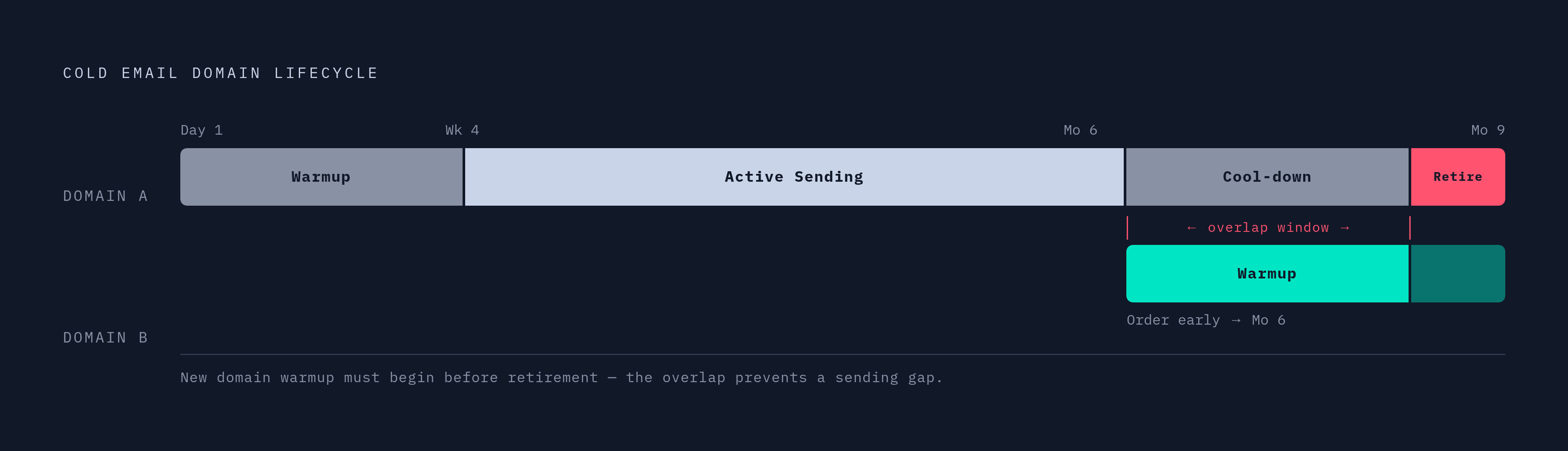
Low-level warmup should continue during active campaigns to support the behavioral record. This creates a capacity-planning constraint. Newly bought domains and mailboxes need time before they can replace assets that are winding down, so ordering them too late leaves a warmup gap. Pre-warmed domain services address that bottleneck as a distinct product category, but the underlying operational requirement remains a pipeline of assets ready before existing capacity is withdrawn.
Sending rotation and volume distribution across the domain portfolio
Sending software makes the portfolio work as a system by spreading messages across mailboxes and automatically keeping each inbox within its limits. Runtime control must reflect the architecture. A large domain inventory offers little protection if the sending platform concentrates activity in a few mailboxes.
Providers’ behavioral AI can recognize tightly correlated domains with the same registrar, provider, cadence, and similar names, reducing the benefit of nominal diversification. Using separate inboxes for different ideal customer profiles makes sending patterns more varied and makes it easier to trace complaints to an audience. When every audience shares the same domain, root-cause analysis becomes much harder.
Domain rotation cadence remains unsettled among practitioners. One lifecycle places warmup at days 1–21, active sending from week 4 through month 6, cool-down during months 6–9, and retirement at month 9. Other approaches treat four to six months of active sending as the point to reduce volume or rest a domain, even with healthy metrics. These schedules differ, but both require planned replacement.
Adding a new domain and mailboxes incrementally each month while phasing out older, higher-risk assets avoids making the whole replacement pool unavailable during warmup.
Where Infraforge and Maildoso fit in managing infrastructure at scale
Managing DNS changes, mailbox provisioning, warmup, and rotation manually becomes an operational bottleneck across dozens of domains. Infrastructure platforms address that coordination burden rather than changing the underlying deliverability rules. Their role is operational control at portfolio scale. Bulk administration helps most when the same change needs to be made across several domains, so each can be updated as part of the group.
Infraforge offers dedicated IPs, automated warmup and monitoring, built-in sender rotation, smart sending limits, and bulk DNS updates across infrastructure. Those functions map directly to the dependencies established earlier. They combine asset configuration with the controls needed to govern live sending, although dedicated-infrastructure claims still require examination of the actual allocation.
Maildoso operates a cold email infrastructure platform powering a large number of mailboxes and handling millions of daily outbound emails for thousands of companies. It is a substantive option for teams that want managed infrastructure. Evaluation should establish whether warmup uses real provider accounts, whether DNS management is genuinely cross-domain, and how IP allocation works.
Platform dependence can reduce visibility and create lock-in. The alternative also has costs, because manually coordinating configuration, rotation, and reserve capacity creates operational fragility. The decision is therefore about how the system will be controlled.
Monitoring signals that indicate infrastructure health before deliverability collapses
Google Postmaster Tools provides per-domain reputation data in its legacy view, while Microsoft SNDS provides per-IP reputation data. These reveal different parts of infrastructure health. Reading them together helps distinguish a domain-level decline from an IP-level exposure rather than treating every placement problem as the same failure. Declining inbox placement over time also signals when rotation may be needed before emergency replacement becomes necessary.
Authentication monitoring must continue after launch because records can change silently. A DKIM record overwritten during a registrar interface update or an SPF record invalidated by a provider change can break sending after an apparently successful setup. Periodic re-verification belongs in routine operations.
Bounces, complaints, and reply rates also help show when to change the sending strategy. Warmed reserve domains and mailboxes let those changes happen without another wait when an asset needs to be taken out of use. Monitoring therefore feeds directly into capacity planning. Healthy assets keep sending, assets whose health is declining move toward fewer sends or rotation, and replacements are added over time through rolling expansion as the system’s reports guide how it is run.